Automated Bank Reconciliation and Data Cleaning
| Role | Accountant |
| Environment | UAE, VAT-registered company |
| Tools | Excel, Power Query, Google Sheets, Apps Script, VBA |
The problem
Bank statements arrived as CSV and Excel exports with inconsistent date formats, extra header rows and debit and credit amounts in separate columns. Matching them to the ledger was done line by line, which was slow at month-end and made errors hard to trace.
My approach
- Standardize the data. Power Query steps remove header noise, trim descriptions, convert text dates to real dates and combine debit and credit into a single signed amount.
- Match automatically. Each bank line is matched to a ledger line on amount and reference, within a three-day date window. Every ledger line can be used only once.
- Isolate exceptions. Unmatched bank lines, unmatched ledger lines and possible duplicates are listed separately, so review time goes only to items that need judgment.
- Prove the result. A control check confirms that opening balance plus movements equals closing balance, and the difference must be zero before sign-off.
Workflow
 Case Study 3: under the ## Demo: receivables ageing report heading, add this li
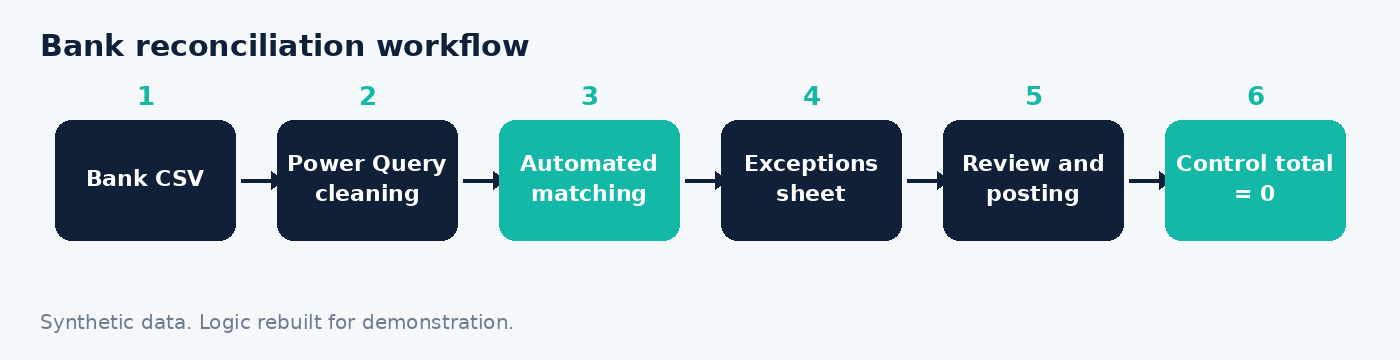
Bank CSV → Power Query cleaning → Automated matching → Exceptions sheet → Review and posting → Control total check
Case Study 3: under the ## Demo: receivables ageing report heading, add this li
Bank CSV → Power Query cleaning → Automated matching → Exceptions sheet → Review and posting → Control total check
Controls
- Matching rules are documented: exact amount, three-day date tolerance
- No ledger entry is matched twice
- All exceptions are reviewed and cleared before month-end sign-off
Outcome
Manual line-by-line matching was replaced with exception-based review. The process is repeatable each month, produces a clear audit trail, and supports a faster and more reliable close.